
The skeleton
Bones first: the pieces hang on them. Pip has sixteen, in a tree that starts at the hips.
Make room
Press Ctrl+0 to see the world at its own size, then drag the empty canvas with the Select tool (Q) so that the origin, where Pip will stand, is low in the window.
Draw the bones
- Choose the Create tool (B). With nothing selected, drag from the hips upwards: the first bone, a root.
- Type its name in the field Name of the right panel, and press Enter.
- The new bone stays selected, and the next drag draws a bone under it: draw the chest from the tip of the hips, then the head from the tip of the chest.
- To start a branch, select its parent in the tree on the left first: the ears under the head, the arms under the chest, the legs and the tail under the hips.
| Bone | Under | Drawn |
|---|---|---|
| hips | nothing | up, short, a little above the knees |
| chest | hips | up, to the shoulders |
| head | chest | up, from the neck to the top of the head |
| ear back, ear front | head | up, from the top of the head |
| arm back, arm front | chest | down, from the shoulder |
| thigh back, thigh front | hips | down, to the knee |
| shin back, shin front | the thigh | down, to the ankle |
| foot back, foot front | the shin | forward, along the ground |
| tail 1, tail 2, tail 3 | hips, then each other | back and up, in a line |
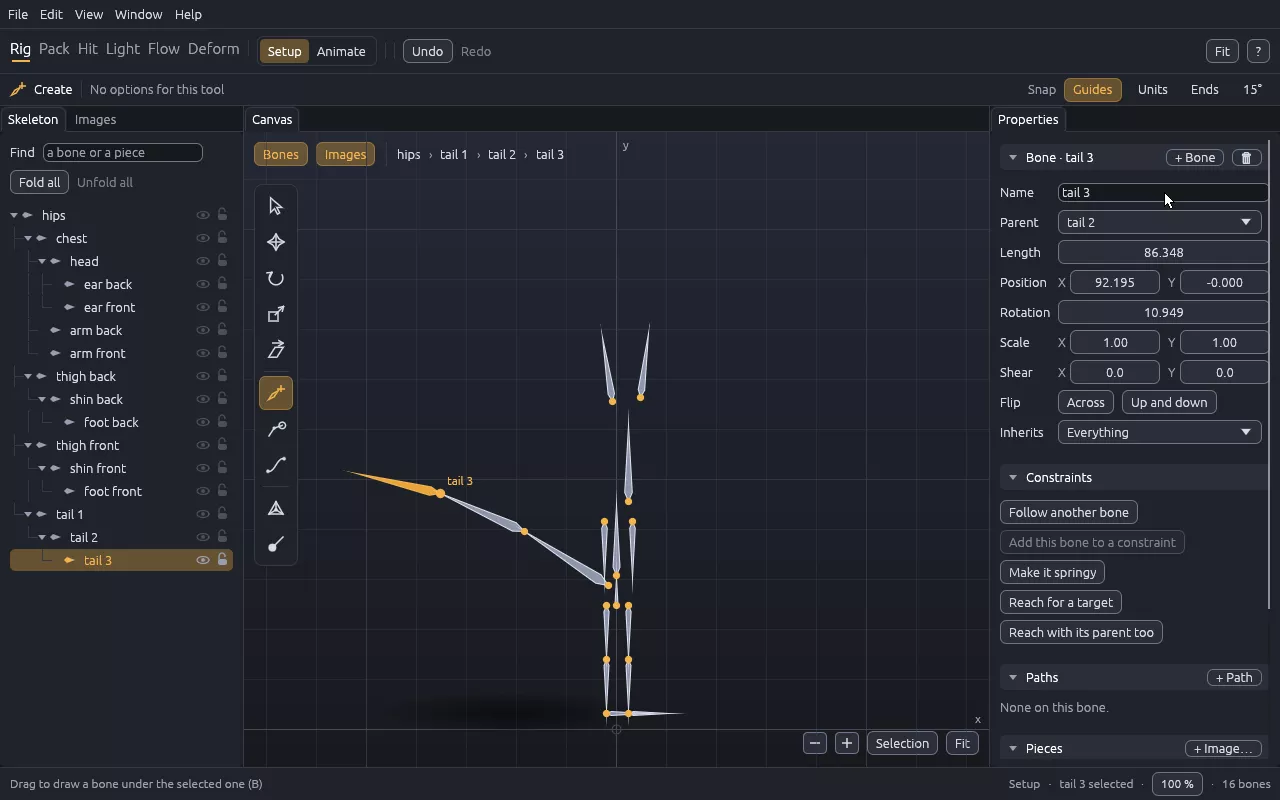
A bone that went wrong: Ctrl+Z, or select it and change its numbers in the panel. Parent puts it under another bone without moving it.