
This page is docs/godot.md of the repository, as it is on main.
Pantin in Godot
runtimes/godot is the Godot runtime of pantin: a GDExtension written in Rust with
godot-rust 0.5.5, over the same pantin-runtime and pantin-core
as the application. It adds one node, PantinCharacter, that plays the character of a pantin
character in a scene, from the bundle pantin build writes or from the project folder: its graph
of states, or its animations on tracks, crossfaded, its springs swinging as the node moves, its
constraints, its meshes and clips, its boxes, and its events as signals. A game shows what the
editor showed, computed by the same code.
What it lacks is said at the end.
In the browser
The example can be exported for the web, to be played in a browser.
tools/godot_web.sh <out> builds it: the library for the web
by emscripten 4.0.20, the version Godot 4.7.2 was built with, and a Rust nightly of a given day
that builds the standard library for the web (--features web, the experimental-wasm of
godot-rust); then Godot exports the example with its template web_dlink_nothreads_release, which
tools/godot_template.py takes out of the release alone. With no threads, the page needs no
cross-origin isolation from its server. Panics abort there: the engine of the web has no
exceptions of WebAssembly to unwind them with.
Trying the example
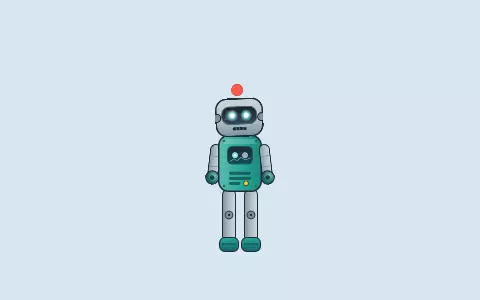
The example is a Godot project in runtimes/godot/example: the robot of the examples, walking with
the arrows and waving with Space. It needs Godot 4.6 or later.
tools/godot_example.sh            # builds the library, copies it and the robot into the example
godot -e --path runtimes/godot/example
tools/godot_example.sh --release builds the library optimised, as a game would ship it. The
script copies the projects rather than linking them: Godot packs what is inside the folder of the
game.
In a game of your own
- Build the library (
cargo build -p pantin-godot --release) and put it in the game, inbin/:libpantin_godot.soon Linux,pantin_godot.dllon Windows,libpantin_godot.dylibon macOS. - Copy
runtimes/godot/example/pantin.gdextensionbeside it, at the root of the game. - Write the bundle of each character,
pantin build name.pantin --out game/characters/name.pantinpack, and choose it as the Bundle of aPantinCharacterin a scene. One file holds the skeleton, the animations, the boxes, the graph and the atlas. - Or copy the project folder (
name.pantin, with itspantin.toml, itsrig.json, itshit.jsonandflow.jsonwhen it has them, and its images) into the game, and choose it as the Project: Godot imports its PNG and SVG images as textures. - When exporting, add
*.pantinpack(or*.toml, *.jsonfor a folder) to Filters to export non-resource files of the preset: Godot packs only its own resources otherwise, and the character would not be found.
The node is a @tool: it plays in the editor as in the game.
The node
PantinCharacter is a Node2D. The skeleton has y up and the node y down: the runtime turns one
into the other, and a unit of the project is a pixel of the node.
| Property | |
|---|---|
bundle |
The bundle, res://…/name.pantinpack, read first. Set again, it is read again. |
project |
The project folder, res://…/name.pantin, read when there is no bundle. Set again, the project is read again. |
animation |
The animation played on track 0 once the character is read. When empty, a character whose project has a graph of states follows it from its entry. |
looping |
Whether that animation starts again at its end. On at first. |
speed |
How fast the time of the character passes, 1 as made. |
| Method | |
|---|---|
fire(trigger) -> bool |
Fires a trigger of the graph: jump, attack. False when it has none of that name. |
set_number(name, value) -> bool, set_switch(name, on) -> bool |
Sets a number or a switch of the graph. |
set_slider(name, time) -> bool, clear_slider(name) -> bool |
Sets the time of a slider, in seconds, over its keys: the character takes the pose its animation has then; clear_slider gives it back to the keys. |
get_state() -> String |
The state of the graph the character is in; empty when it follows none. |
get_active_boxes() -> Array |
The boxes active now, each a dictionary: name, kind (hit, hurt, push) and corners, a PackedVector2Array in the space of the node. |
play(animation, track, looping, fade) -> bool |
Plays an animation on a track from its start, going from what the track played over fade seconds; a character that followed its graph leaves it. False when the project has no such animation. |
stop(track) |
Stops a track at once. |
set_track_weight(track, weight) |
How much a track weighs over those under it, from 0 to 1. |
set_skin(name), get_skin() |
The skin shown, by name (empty: none): its images first, and the bones and constraints only some skins have are there while one of them is shown. set_skin says false when there is no skin of that name. |
set_track_additive(track, additive) |
Whether a track adds what its animation changes from the setup pose to the tracks under it, instead of putting it in their place. |
get_playing(track) -> String |
The animation a track plays, empty when none. |
get_animations() -> PackedStringArray |
The animations of the project. |
get_bone_transform(bone) -> Transform2D |
Where a bone is now, in the space of the node: to hang a Godot node on a hand. |
settle() |
Forgets the swing of the springs, after the node was put somewhere else at once. |
Tracks are laid one over the other, the first at the bottom: each changes only what its animation
keys, by its weight, over the tracks under it (pantin_runtime::Player). A run on track 0 and a
wave on track 1 is a robot that waves as it runs. An additive track adds instead: a nod on an additive
track over the run turns the head a little more than the run does, at its weight
(golden values).
A character whose project has a graph of states (flow.json, the Flow workspace) follows it: the
game only sets parameters and fires triggers, and the graph plays the animations, crossfaded, as
the graph format says.
The signal event(name, int, float, text, track, animation) is told for each event of an
animation as its time is passed: a step for a sound, a landing for dust. An animation that a track
is leaving tells its events during the first half of the crossfade. state_entered(state) is
told when the character enters a state of its graph, and box_edge(name, started) when a range of
a box that asks for its events starts or ends: the moment a blow can land. An event that has a
sound tells event_sound(name, file, volume, balance, track, animation) as well: the file is
relative to the folder of the project, the volume from 0 to 1, the balance from -1 (left) to 1
(right), for an AudioStreamPlayer of the game to play.
The springs feel the node move: carried away, what hangs stays behind for a moment by its skeleton inertia, and the gravity of the skeleton pulls down the screen whatever the node's turn.
@onready var robot: PantinCharacter = $Robot

func _ready() -> void:
    robot.event.connect(func(name, _i, _f, _t, _track, _animation): print(name))

func jump() -> void:
    robot.fire("jump")
Not yet
- The blend modes multiply and screen are drawn as normal, and the dark colour of a slot is not drawn; additive is.
- The library is built and tested on Linux, and for the web; Windows and macOS build it the same way, untested.
- The first
--importof a project in which Godot finds the extension aborts as it quits, its work done (Godot 4.7.2, godot-rust 0.5.5); the next one ends well.
How it is tested
cargo test -p pantin-godot reads, plays and draws the robot with no Godot
(runtimes/godot/src/character.rs), then plays the example in Godot, headless
(runtimes/godot/tests/godot.rs and example/tests/smoke.gd): the library loads, the robot is
read, plays on two tracks, its arm moves, and its two events are heard; read from its bundle it
follows its graph, idle, wave when told hello, idle again; the stickman walking gives its two
boxes and tells the start of the range of its foot. Godot is PANTIN_GODOT or
godot on the path; the test passes over it when Godot is missing, unless PANTIN_REQUIRE_GODOT
is set, as the CI does.